PoE Power Budget Calculator for Security Cameras
Calculate a reliable PoE power budget for security cameras using device demand, port limits, switch capacity and practical design headroom.
By Maxsol Team

A PoE power budget for security cameras is the combined power required by every device that may operate at the same time, plus a sensible allowance for peak demand and future changes. That total must remain within the switch’s available PoE budget, while each individual camera must also fit the power available on its assigned port.
A reliable PoE power budget calculator for cameras therefore needs more than a camera count. Record each camera’s maximum stated power requirement, check its PoE standard, allow for simultaneous high-load operation, and test the result against both port-level and switch-level limits.
Collect each device power requirement
Start with the powered devices (PDs), not the switch. A fixed camera, PTZ camera, intercom, wireless bridge or other PoE endpoint may have a different demand, PoE class and peak-load profile.
For each device, collect the following from its current datasheet, label or manufacturer documentation:
| What to record | Why it matters |
|---|---|
| Device name and location | Makes it easier to trace the calculation back to a camera and cable run. |
| Maximum power requirement | This is the planning figure, rather than a typical or idle consumption value. |
| PoE standard or class | Confirms whether the device needs IEEE 802.3af, 802.3at, IEEE 802.3bt or another power method. |
| Power-demanding features | Infrared illumination, heaters, PTZ movement, zoom, wipers and onboard accessories can increase demand. |
| Operating conditions | Night operation, cold weather and simultaneous alarm activity can affect the likely peak load. |
| Intended switch port | Allows a direct check of that port’s capability and available power. |
| Cable length and type | Long or poor-quality runs can affect delivered power and should be checked against the device and switch documentation. |
Use the manufacturer’s maximum or stated PoE input requirement where it is available. Do not use a low figure observed in a quiet daytime system as the design basis. A camera that appears modest at idle may draw more power when its infrared LEDs activate or when a motorised mechanism moves.
Include more than cameras
The budget must include every device powered from the same switch. It is easy to overlook equipment such as:
- Door stations and access-control readers
- PoE wireless access points
- Point-to-point CPE or bridge equipment
- Alarm interfaces
- Network audio devices
- PoE-powered edge equipment installed in the same cabinet
Devices with their own local power supply do not consume the switch’s PoE budget. However, ensure that the local supply arrangement is documented clearly so it is not accidentally treated as PoE-powered during commissioning or later maintenance.
Build a simple device schedule
A spreadsheet is usually the most useful PoE power budget calculator for a camera project. One row per endpoint is enough.
| Device ID | Device type | Maximum stated demand | PoE requirement | Peak-load notes | Planned port |
|---|---|---|---|---|---|
| CAM-01 | Camera | P₁ W | Confirm from documentation | Record applicable features | Port ___ |
| CAM-02 | Camera | P₂ W | Confirm from documentation | Record applicable features | Port ___ |
| CAM-03 | Camera | P₃ W | Confirm from documentation | Record applicable features | Port ___ |
| AP-01 | Wireless device | P₄ W | Confirm from documentation | Record applicable features | Port ___ |
This approach prevents an important mistake: assuming that all cameras of a similar appearance have the same power draw. Different variants can have very different requirements.
Separate per-port limits from total budget
A switch can have enough total PoE capacity in theory but still fail to power a particular device if that device is connected to a port with an insufficient power limit. Conversely, every port may support the device individually while the switch’s combined budget is too small for all devices to operate at peak load.
Treat these as two separate checks.
Check 1: Is the port suitable for the device?
For every endpoint, confirm:
- The port supports the required PoE standard.
- The port’s maximum power output meets or exceeds the device’s stated requirement.
- The switch and device support appropriate power negotiation.
- The cable route, connectors and environmental conditions suit the planned installation.
- Any non-standard or passive PoE arrangement is not being connected to an IEEE PoE port without confirming compatibility.
IEEE 802.3af, 802.3at and 802.3bt are related standards, but they are not interchangeable shorthand for “enough power”. A camera requiring more than the port can provide may fail to start, restart intermittently, lose functions at night or be denied power when other ports are busy.
Check 2: Does the switch have enough shared power?
The total PoE budget is the pool of power that the switch can allocate across its powered ports. Your calculated design load should be within that budget after allowing for your chosen headroom.
A useful rule is:
Every individual device must fit its port limit, and the sum of all simultaneous device loads must fit the switch budget.
Do not multiply the maximum power of one port by every physical port and assume that result is available. Many switches have a shared PoE budget that is lower than the theoretical sum of all port limits.
Also distinguish carefully between:
- Total PoE budget: the documented power available for PoE devices.
- Internal power supply rating: the rating of the switch’s internal supply, which may also support switching electronics and other functions.
- Per-port maximum: the limit available on one specific powered port.
- Physical port count: the number of Ethernet ports, which may include uplinks or non-PoE ports.
These terms are related, but they are not the same specification.
Add simultaneous load and headroom
The key calculation is based on what could reasonably be active together. For security systems, that often means considering night-time operation rather than an average daytime load.
Add the maximum stated requirement for each device that may be powered simultaneously:
Simultaneous load = P₁ + P₂ + P₃ + … + Pₙ
Then add design headroom:
Design budget = simultaneous load × (1 + headroom allowance)
For example, if your project policy uses 25% headroom, multiply the simultaneous load by 1.25. The right allowance depends on the project, but it should be selected deliberately and documented rather than left as an assumption.
Headroom can help accommodate:
- Peak load where several cameras activate infrared illumination together
- PTZ movement occurring at the same time
- A later camera replacement with a higher stated demand
- An added endpoint on a spare powered port
- Uncertainty that remains until final device specifications and cable routes are confirmed
Headroom is not a substitute for correct compatibility. A camera whose stated power requirement exceeds the selected port’s maximum must be assigned to a suitable port or provided with an appropriate alternative power arrangement, even if the overall switch budget looks generous.
Avoid using average load as the only figure
Average consumption can be useful for operational monitoring, but it is not normally enough for design. A system designed only around average draw may work initially, then show faults when cameras enter higher-demand operating modes.
Where a manufacturer states a maximum requirement, use it. If documentation provides different values for operating modes, base the design on the worst credible simultaneous condition for that site. For example, a perimeter installation may need to assume that all cameras operate in low-light mode at once.
Work through a neutral calculation method
Use this repeatable process for a new installation, an extension or a switch replacement.
Step 1: List all PoE-powered endpoints
Create a list of cameras and non-camera devices powered from the switch. Identify which devices are already installed and which are planned for later stages.
Step 2: Enter each maximum stated device demand
Enter the maximum stated PoE demand for each device as P₁, P₂, P₃ and so on. Keep the source document alongside the calculation so future installers can verify it.
Step 3: Identify simultaneous peak groups
If every endpoint can reach peak demand together, include every device in the sum. If the design has truly separate operating groups, document why their peaks cannot overlap before excluding any from the simultaneous calculation.
For many camera systems, the conservative assumption is that all cameras can enter night mode at the same time.
Step 4: Calculate the simultaneous load
Add the relevant device requirements:
Psimultaneous = Σ Pdevice
This is the power your switch must be able to allocate before headroom.
Step 5: Apply your design allowance
Choose and document an allowance, then calculate:
Pdesign = Psimultaneous × (1 + H)
Where H is the headroom expressed as a decimal. For instance, an allowance of 20% is written as 0.20.
Step 6: Test each planned port
For every row in the device schedule, confirm:
Device maximum requirement ≤ assigned port’s documented power limit
Also confirm the required PoE standard for that port.
Step 7: Test the full switch budget
Confirm:
Pdesign ≤ switch’s documented total PoE budget
Where the switch documentation states an internal power supply rating rather than an explicit total PoE budget, do not assume they are identical. Obtain the documented usable PoE allocation and any applicable operating conditions before finalising the design.
Step 8: Review expansion separately
If spare ports are reserved for future cameras, decide whether the present switch has budget for those endpoints as well. A spare data port is not automatically a spare high-power PoE port.
Compare 120W, 300W and 400W examples
The following examples show why port capability and total available power need to be read together. They are switch specifications, not assumed camera loads. Enter the real maximum demand of your selected devices into the method above.
| Example switch | Verified power information | Documented powered-port information | What to check in your calculation |
|---|---|---|---|
| 120W example | 120W total PoE budget | Ports 7–8 support IEEE 802.3bt up to 60W | Confirm every device’s assigned-port limit, then keep the complete design load within 120W. |
| 300W example | 300W internal power supply | Ports 1–8 support IEEE 802.3af/at up to 30W per port | Verify the documented total PoE allocation rather than treating the power-supply rating alone as the usable PoE budget. |
| 400W example | 400W total PoE budget | Ports 1–48 support IEEE 802.3af/at up to 30W per port | Check each device is within 30W and keep the headroom-inclusive load within 400W. |
For a compact system where particular high-power endpoints need to be placed on the relevant ports, review the 120W 8-port Gigabit PoE switch with two uplink ports. Its documented total PoE budget is 120W, and ports 7–8 support IEEE 802.3bt up to 60W.
For a design based on IEEE 802.3af/at endpoints, the 16-port Gigabit PoE switch with two uplink ports and a 300W power supply documents support of up to 30W per port on ports 1–8. Confirm the available total PoE budget in the applicable documentation before using it as the basis of a full system calculation.
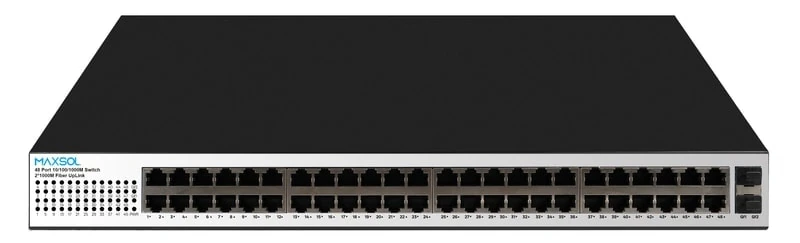
For larger deployments, the 48-port Gigabit PoE switch with two uplink ports and a 400W budget has a documented 400W total PoE budget, with ports 1–48 supporting IEEE 802.3af/at up to 30W per port.
How to use the comparison properly
Do not select a switch solely because its total wattage appears larger than your first calculation. Review these questions:
- How many endpoints need PoE now, and how many are planned later?
- Which endpoints require IEEE 802.3at or IEEE 802.3bt?
- Does any single device require more than the intended port can provide?
- Is the quoted figure a total PoE budget or merely an internal power-supply rating?
- Is the calculated design load within the documented budget after headroom?
- Are higher-demand devices assigned to the specific ports that support them?
A 400W switch is not automatically preferable to a lower-budget model if the port layout, required standards or deployment size do not match. Equally, a smaller switch with a suitable high-power port does not remove the need to check its shared total budget.
Recheck the design before installation
A final review immediately before installation catches changes that often occur between design, procurement and commissioning.
Pre-installation checklist
- Confirm the exact camera and endpoint variants supplied match the versions used in the calculation.
- Recheck each device’s maximum stated PoE requirement and required standard.
- Confirm the chosen switch’s total PoE budget and individual port limits from current documentation.
- Map every powered device to a specific switch port.
- Verify cable category, route length, terminations and outdoor protection arrangements are suitable for the device and PoE design.
- Include all shared PoE loads, including access-control and wireless equipment.
- Confirm the switch’s upstream network capacity and uplink arrangement separately from its power budget.
- Retain the final power schedule in the site handover documents.
- Test the system under credible high-load conditions, such as low-light camera operation, rather than only during a quiet daytime check.
Common PoE budgeting mistakes
The most frequent errors are straightforward but consequential:
- Counting cameras instead of watts. Camera count does not establish power demand.
- Using typical consumption only. Design around the maximum credible simultaneous load.
- Ignoring the per-port ceiling. A high-power camera may not work on every PoE port.
- Confusing a power-supply rating with a PoE budget. Confirm the actual allocation available to powered devices.
- Forgetting other PoE devices. Wireless and access-control equipment can consume material capacity.
- Treating spare ports as spare power. Future capacity must be calculated, not assumed.
- Skipping cable and environment checks. The switch budget is only one part of a reliable powered network design.
FAQ
How much PoE power does a security camera need?
There is no single correct figure. Use the maximum stated PoE requirement for the exact camera model and account for functions that can increase demand, such as infrared illumination, PTZ movement or environmental accessories.
Should I add all camera maximum loads together?
Usually, yes, if those cameras can reach high-demand operation at the same time. If you exclude loads because they are in separate operating groups, record the technical reason and ensure the assumption remains valid after future changes.
Is a 300W internal power supply the same as a 300W PoE budget?
Not necessarily. An internal power supply rating and the PoE budget are different specifications. Check the manufacturer’s documented total PoE allocation before calculating how many devices the switch can support.
Why can a camera fail when the switch still has spare ports?
The assigned port may not support the camera’s required PoE standard or maximum power level. Alternatively, the shared switch power budget may already be committed to other active devices.
A sound camera PoE calculation gives you a traceable basis for switch selection, commissioning and future expansion. Compare the linked Maxsol models against your required port count, calculated simultaneous load, cable distances, available source power, installation environment and management requirements before specifying the final equipment.