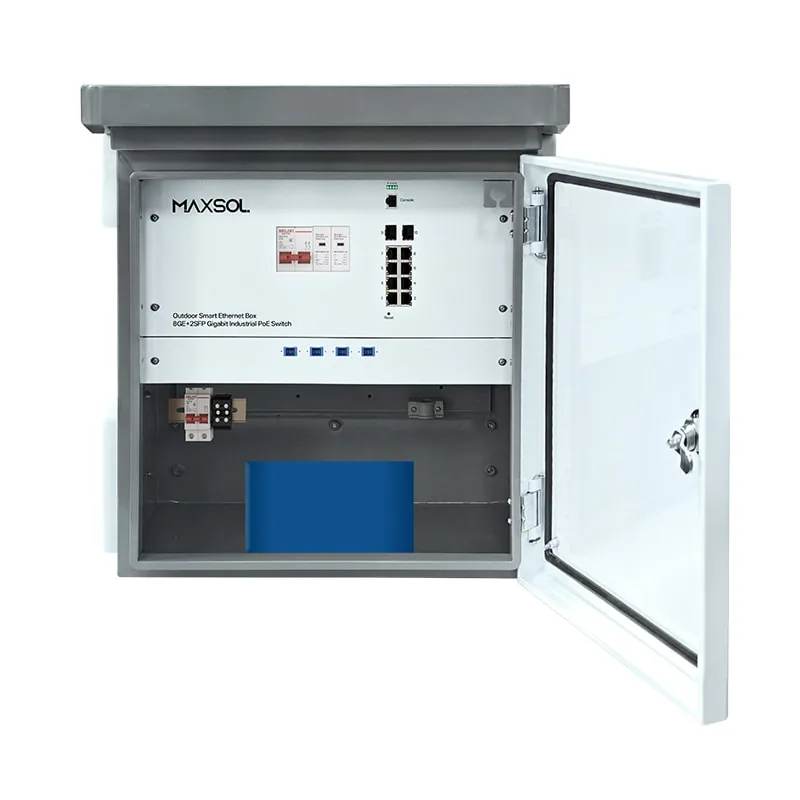
Outdoor PoE Switch Box With Battery Backup: NZ Guide
Choose an outdoor PoE switch box with battery backup: assess IP protection, fibre uplinks, managed networking, AC supply, surge control and load.
By Maxsol Team

An outdoor PoE switch box with battery backup can simplify a remote camera, wireless bridge or access-point installation by housing PoE switching, mains power conversion and—where specified—backup power in one weather-protected location. The right choice depends less on the number of ports alone than on the actual PoE load, fibre hand-off, outage requirement, cable-entry design and environmental exposure.
For New Zealand installations, start by confirming the enclosure will remain protected after mounting, gland installation and cable routing. Then size the power system around the devices’ real and peak demand, rather than assuming a battery-equipped box will provide a fixed runtime.
Why integrate switching and power outdoors
Outdoor networked equipment often needs to be installed far from the communications rack: on a perimeter fence, carpark pole, farm building, gate, wharf-side structure or a separate equipment area. Running individual data and power cables back to an indoor cabinet can add cable distance, voltage-drop concerns and installation complexity.
An integrated outdoor PoE box can bring together several functions at the field location:
- PoE ports for cameras, access points, CPEs or other Ethernet endpoints
- Fibre uplinks where copper distance limits or electrical separation matter
- An AC input for local mains supply
- A DC UPS module and, in selected designs, an integrated battery
- A lockable, weather-resistant enclosure that reduces the number of separate field enclosures
This approach is especially useful when several devices share one location. Rather than mounting a switch, power supply, battery enclosure and protection hardware separately, the designer can assess the complete node as one system.
Integration does not remove the need for sound site design. The cabinet still needs a suitable mounting surface, safe cable routes, correctly selected circuit protection, earthing arrangements where required, and enough room for cable bend radius and service access.
What an integrated box does not guarantee
A combined box is not automatically a complete resilience solution. Before selecting one, establish:
- Which loads must stay online during an outage. A critical camera may need backup power, while an ancillary wireless link may not.
- How much power those loads draw in normal and peak modes. PTZ movement, infrared illumination, heaters and radios can change demand.
- Whether the network path upstream is also backed up. Keeping field cameras powered is of limited value if the fibre termination, recorder, router or core switch loses power.
- What environmental and physical risks exist at the site. Wind-driven rain, direct sun, coastal corrosion, vehicle impact and vandalism can each change the installation approach.
Enclosure and environmental checks
Ingress protection is a starting point, not the entire environmental specification. An IP65 enclosure is rated as dust-tight and protected against water jets, but final protection depends on the installed system: intact seals, correctly fitted glands, unused entries sealed, and cable routes that do not guide water into the enclosure.
The managed SBOX2802SFG-I and the battery-equipped SBOX2802SFG-I-288WH are specified as IP65. Check the product documentation and installation instructions for all remaining suitability factors, including mounting position, cable-entry method, operating conditions and maintenance access.
Check the real exposure, not just the IP rating
For an outdoor cabinet location, assess:
- Rain and wash-down exposure: Place entries and cable loops so water sheds away from glands. Use suitable outdoor-rated cable and fittings.
- Sun and heat: A dark cabinet in direct afternoon sun can experience higher internal temperatures than the surrounding air. Avoid assuming an IP rating indicates a temperature rating.
- Coastal or industrial conditions: Salt, airborne contaminants and corrosion can affect mounts, cable hardware and external metalwork. Choose compatible mounting and sealing components.
- Condensation: Day-to-night temperature swings can create moisture inside an enclosure. Plan cable entries and servicing practices to avoid leaving the cabinet open unnecessarily.
- Physical exposure: Install at a sensible height and location, away from likely vehicle strikes, public interference and low-hanging branches.
- Service access: Allow enough room to open the door or cover, inspect cables, replace components where applicable and read labels safely.
Fibre uplink planning
The box configurations compared here have two Gigabit SFP slots. Fibre can be a sensible option between an outdoor node and the main network because it supports longer links than typical copper Ethernet runs and can help avoid a conductive path between locations.
However, two SFP slots do not by themselves determine the full fibre design. Confirm:
- The required fibre type and connector arrangement
- The appropriate optic or transceiver for both ends of the link
- Link distance and optical budget
- Whether one or two fibre paths are needed
- Splice, patching and enclosure arrangements
- How the fibre will be protected from crushing, sharp bends and moisture ingress
Do not assume an SFP module is included, or that any optic will suit the switch, simply because the box has SFP slots.
AC supply, earthing and surge protection
The SBOX2802SFG-I is specified with an AC100–240V input. That range covers New Zealand’s nominal mains supply, but the complete installation still needs to be designed and installed appropriately for the site. Arrange qualified electrical work where required.
Outdoor locations can be exposed to switching transients, lightning-related surges and potential differences between buildings or structures. Assess surge protection as a system rather than a checkbox on the cabinet specification:
- Determine whether protection is required at the incoming AC supply.
- Consider protection for copper data paths that enter or leave the outdoor zone.
- Follow the site’s earthing and bonding design.
- Keep protection leads and earth connections appropriately routed and as practical as the electrical design requires.
- Use fibre where it is appropriate for the inter-building or remote-link design.
- Confirm whether any surge protection is integrated into the selected equipment; do not assume it is included.
Surge protective devices reduce risk but do not make equipment immune to every electrical event. A poor earth connection, long exposed copper run or incorrect installation can undermine the intended protection.
Managed versus unmanaged switching
Choose managed switching when you need visibility and control at a remote network node. Choose unmanaged switching when the topology is straightforward and the priority is a simpler fixed-function deployment.
A managed outdoor switch is useful for projects where an installer or network team needs to separate traffic, observe links, apply policy or diagnose a fault without guessing which endpoint is causing trouble. The exact available Layer 2 functions should always be confirmed against the model documentation before writing a network design around them.
An unmanaged option can be suitable for a small, stable group of endpoints where the network architecture already provides control elsewhere. It may reduce commissioning steps, but it also gives the operator fewer tools for remote fault isolation and configuration.
When Layer 2 management is worthwhile
Management is generally worth considering when the field box supports:
- Cameras and wireless equipment on separate network segments
- A site that may grow over time
- Devices maintained by different teams
- Troubleshooting requirements beyond checking link LEDs
- A fibre-connected node where remote diagnosis can avoid a site visit
- Traffic prioritisation or network segmentation requirements
The SBOX2802SFG-I managed industrial smart Ethernet box combines eight Gigabit PoE ports, two Gigabit SFP slots, Layer 2 management, an AC100–240V input and a built-in 240W DC55V UPS module. Its UPS module supports a power-resilience design, but a backup runtime must not be assumed without confirming the energy-storage arrangement and connected load.
When an unmanaged design makes sense
For a fixed field deployment with uncomplicated connectivity, an unmanaged switch may be the more direct choice. The SBOX1802SFG-I industrial smart Ethernet box is an IP65 unmanaged model with eight Gigabit PoE ports, two Gigabit SFP slots and a 300W power supply.
It also includes DIP-selectable watchdog, isolation, VLAN and priority functions, plus QoS. These fixed selectable functions can be helpful where basic traffic separation or recovery behaviour is needed without configuring a fully managed switch. Confirm the intended operating mode and the effect of each DIP setting before commissioning, and document the final settings inside the project records.
UPS and battery-backup requirements
A UPS module and a battery are related but different parts of the design. The UPS manages continuity between the normal supply and backup source; the battery stores the energy. An outdoor PoE switch box with battery backup needs both an appropriate power path and enough battery energy for the required load and outage period.
The key question is not, “How long does this battery last?” It is, “What must remain powered, at what load, for how long, under what conditions?”
Build a realistic load budget
List every powered device at the outdoor node. Include:
| Load item | What to record |
|---|---|
| PoE cameras | Typical and maximum power, including night operation and moving functions |
| Wireless APs or bridges | Normal draw, peak transmit demand and any attached equipment |
| Switch and internal electronics | The switch’s own consumption where specified |
| Fibre equipment | Any separate media, optical or network equipment requiring power |
| Future ports | A sensible allowance if expansion is likely |
| Start-up behaviour | Inrush or simultaneous boot demand after a power restoration |
Add the maximum expected demand, then compare it with the box’s available power budget and the power requirements of each endpoint. Do not use only the switch’s power-supply rating as a proxy for available PoE power; confirm the relevant product specifications and total system budget.
Estimate backup time carefully
Battery capacity is often stated in watt-hours (Wh). A simple theoretical starting point is:
Backup time in hours = battery energy in Wh ÷ load in W
For example, 288Wh divided by a steady 100W load gives 2.88 hours as an idealised arithmetic result. It is not a promised operating time. Conversion losses, battery-management behaviour, temperature, ageing, peak load and the actual draw of connected PoE devices all affect the outcome.
Design to a defined outcome instead:
- “Keep four essential cameras and the fibre uplink operating for the specified outage period.”
- “Maintain the gate controller and one security camera; non-critical APs may shut down.”
- “Provide enough ride-through time for brief supply interruptions, not extended outages.”
Then validate the complete load profile and product documentation before finalising the design.
Battery-equipped option
The SBOX2802SFG-I-288WH managed smart Ethernet box with built-in battery adds a built-in 48V 6Ah 288Wh LiFePO4 battery to the IP65 managed platform. It also has eight Gigabit PoE ports, two Gigabit SFP slots, Layer 2 management, AC100–240V input and a built-in 240W DC55V UPS module.
The stated 288Wh battery capacity is useful input for a load calculation, but it should not be converted into a fixed number of backup hours without accounting for the actual connected equipment and operating conditions.
Common battery-backup mistakes
Avoid these frequent design errors:
- Sizing battery backup from camera quantity instead of measured or specified wattage
- Ignoring higher night-time camera consumption
- Forgetting that the upstream network and recording infrastructure also need backup
- Treating a nominal Wh figure as fully available energy in every condition
- Adding new endpoints later without revisiting the power and runtime calculation
- Failing to define which loads are essential during an outage
- Installing a battery system where access for inspection and service is impractical
Compare three Maxsol smart boxes
The following comparison focuses only on the verified features for these models. Confirm all remaining details—such as endpoint PoE compatibility, supported management functions, environmental limits, installation dimensions and supplied accessories—before procurement.
| Selection factor | SBOX2802SFG-I | SBOX2802SFG-I-288WH | SBOX1802SFG-I |
|---|---|---|---|
| Enclosure rating | IP65 | IP65 | IP65 |
| PoE ports | 8 Gigabit PoE ports | 8 Gigabit PoE ports | 8 Gigabit PoE ports |
| Fibre connectivity | 2 Gigabit SFP slots | 2 Gigabit SFP slots | 2 Gigabit SFP slots |
| Switching approach | Layer 2 managed | Layer 2 managed | Unmanaged |
| AC input | AC100–240V | AC100–240V | Check the model specification |
| Power / UPS detail | Built-in 240W DC55V UPS module | Built-in 240W DC55V UPS module | 300W power supply |
| Built-in battery | Not specified | 48V 6Ah 288Wh LiFePO4 battery | Not specified |
| Additional stated functions | Not specified beyond Layer 2 management | Not specified beyond Layer 2 management | DIP-selectable watchdog, isolation, VLAN and priority, plus QoS |
A practical selection path is:
- Choose SBOX2802SFG-I when Layer 2 management, IP65 protection, eight PoE ports, dual Gigabit SFP connectivity and the stated UPS module suit the power architecture, with battery requirements confirmed separately.
- Choose SBOX2802SFG-I-288WH when the design requires those managed switching and uplink features together with the stated built-in 288Wh LiFePO4 battery.
- Choose SBOX1802SFG-I when an IP65 unmanaged design with eight Gigabit PoE ports, two Gigabit SFP slots, a 300W power supply and the stated DIP-selectable functions suits a simpler field node.
Installation planning checklist
Use this checklist before ordering equipment or sending an installer to site.
Network and endpoint checks
- Count present endpoints and likely future additions.
- Record each endpoint’s normal and peak power requirement.
- Confirm Ethernet and PoE compatibility for every device.
- Confirm whether eight PoE ports are enough after allowing for expansion.
- Define the fibre topology and verify compatible SFP optics for both ends.
- Confirm whether Layer 2 management is required for the intended network design.
- Identify which ports or devices must have priority during an outage.
Power and backup checks
- Confirm the available site supply and the electrical installation approach.
- Calculate the total connected load, including peak operating conditions.
- Check the relevant switch power budget rather than relying on endpoint count.
- Set a target backup duration for essential equipment.
- Calculate a preliminary battery-energy requirement, then allow for real operating losses and conditions.
- Confirm the upstream fibre, routing and recording equipment have an appropriate resilience plan.
- Establish how power will recover after an outage and whether all devices restart in a controlled way.
Enclosure and site checks
- Select a mounting location protected from unnecessary solar heat, impact and tampering.
- Confirm the enclosure’s IP rating fits the site exposure and that installed glands will maintain protection.
- Plan downward-facing cable routes or drip loops where appropriate.
- Allow correct cable bend radius, especially for fibre.
- Assess AC and data surge risk, earthing and bonding requirements.
- Keep installation records showing port allocations, fibre paths, device loads and any DIP settings.
- Leave safe service access for future inspection and fault finding.
FAQ
Does an IP65 outdoor PoE box work in all outdoor conditions?
No. IP65 addresses dust and water-jet ingress when the enclosure is correctly installed. It does not by itself confirm suitability for every temperature, solar-load, coastal, corrosive or impact-exposed location. Review the full site conditions and product documentation.
Can a 288Wh battery run eight PoE cameras?
Possibly, but the camera count alone cannot answer the question. Runtime depends on the actual combined wattage of the cameras, switch and any other connected equipment, including higher-demand night or movement modes. Calculate using the real load and do not treat a nominal calculation as a guaranteed runtime.
Why use fibre for an outdoor PoE box?
Fibre is often selected for longer-distance network links and for designs where a non-conductive connection between locations is useful. The box, optics, fibre type, connectors and link budget must all be specified together.
Is managed switching necessary for a small camera installation?
Not always. An unmanaged approach can suit a straightforward, stable network. Managed switching is more valuable when segmentation, visibility, remote troubleshooting or future expansion is important.
Compare the linked Maxsol models against your required port count, endpoint load, fibre distance, AC supply, environmental exposure and management needs before selecting an outdoor PoE switch box with battery backup.