90W PoE++ 802.3bt Switch Guide for NZ Installers
Learn when a 90W PoE++ 802.3bt switch is needed, how to check cable and power budgets, and how to compare practical port options.
By Maxsol Team

A 90W PoE++ 802.3bt switch is appropriate when a powered device needs substantially more power than standard PoE or PoE+ can deliver, or when you need headroom for high-load equipment over a single Ethernet cable. Typical examples include advanced PTZ cameras with heaters, illuminators or wipers, multi-radio wireless access points, and certain access-control or industrial devices.
However, “90W per port” is not a complete specification. The powered device must support the relevant PoE method, the switch port must be a high-power port, the cable must be suitable and in good condition, and the switch’s input supply and total PoE budget must support the combined load. A 90W PoE++ 802.3bt switch can simplify an installation, but only when the whole power path has been checked.
PoE classes in practical terms
PoE sends DC power and network data through the same twisted-pair Ethernet cable. It can remove the need for a separate mains outlet or local power supply at every camera, access point or network endpoint.
In buying discussions, the most useful distinction is not the marketing label alone, but the amount of power available at the powered device (PD) after cable losses.
| PoE category | Common standard reference | Typical practical use | Selection point |
|---|---|---|---|
| PoE | IEEE 802.3af | Basic IP cameras, VoIP phones, simple sensors | Suitable for low-power endpoints |
| PoE+ | IEEE 802.3at | Many fixed cameras, Wi-Fi access points and intercoms | A common choice where device demand exceeds basic PoE |
| PoE++ / high-power PoE | IEEE 802.3bt terminology is commonly used | High-load PTZ cameras, powerful wireless equipment and specialist devices | Check the device’s required class, input range and pair requirements |
| 90W high-power PoE | Often associated with the upper end of 802.3bt Type 4 discussions | Devices with a high peak or continuous power demand | Confirm actual power at the PD, port allocation and total switch budget |
The input rating printed on a powered device is the starting point. A camera labelled “24V DC, 2A” may have a maximum consumption of 48W, but that does not automatically mean it can accept PoE or needs a 90W port. Check its datasheet for:
- Supported PoE standard or high-power PoE mode
- Maximum and typical power draw
- Whether its stated consumption includes heater, blower, wiper and IR illumination
- Whether it needs power on two pairs or all four pairs
- Its required network speed and connector type
- Any stated cable category or maximum cable length requirement
Do not size a switch from average consumption alone. Outdoor cameras can draw much more power when infrared lighting activates, a PTZ motor moves, or environmental accessories operate. A device that normally draws modest power may briefly approach its stated maximum.
It is also important to separate the switch’s port-side output rating from what the device receives. Power is lost as heat through the cable, particularly over longer runs and smaller conductors. Therefore, a port described as supporting up to 90W does not mean every endpoint will receive 90W at the far end of a 100-metre cable.
When higher-power devices need 802.3bt
Specify 802.3bt-class high-power PoE when PoE+ is demonstrably insufficient or leaves no sensible operating margin. The strongest reason is the device manufacturer’s required PoE specification, not an assumption that a larger camera or access point always needs more power.
Devices that can justify a 90W port
A high-power port may be warranted for:
- PTZ surveillance cameras with high-output IR, heating, cooling, demisting, washers or wipers
- Multi-sensor or panoramic cameras with integrated lighting
- Outdoor wireless access points or point-to-point equipment with a high declared input demand
- Building-entry or security devices combining a camera, display, card reader and locking-related functions
- Industrial endpoints with a specified high-power PoE input
- Remote equipment where one Ethernet run must carry both network traffic and a larger power load
For a solar-powered or battery-backed site, higher-power PoE also requires special care. PoE may reduce field wiring, but it does not reduce the energy needed by the endpoint. Calculate daily consumption from realistic operating load and peak demand, then account for the system’s power source, storage, conversion losses and low-light operating period.
When PoE+ is the more sensible choice
Do not choose a 90W PoE++ 802.3bt switch simply because it is labelled as higher specification. Standard PoE or PoE+ may be a better fit when:
- All powered devices have a low documented demand
- The site has many endpoints but a limited central power source
- Cable runs are old, unknown or likely to have poor terminations
- The network only needs conventional fixed cameras or low-power access points
- The additional high-power ports would remain unused
High-power ports can provide flexibility for future upgrades, but that benefit should be weighed against the required input capacity and the number of ports that genuinely need higher power.
A common mistake: treating every port as a 90W port
Many switches have only selected high-power ports. This is normal and can be cost-effective, but it changes how you allocate devices.
For example, a switch may have eight PoE-capable access ports while only two are documented for 90W operation. Put the high-load equipment on those specific ports and reserve ordinary PoE or PoE+ ports for lower-demand devices. Labelling patch leads and maintaining an as-built port schedule helps prevent a later move from causing an unexpected power fault.
Verify ports, pins, cable and input supply
A successful high-power PoE installation depends on the entire path: power source, switch, cable, terminations and powered device. Checking only the switch’s front-panel label is not enough.
Confirm the port’s actual power capability
Before procurement, identify:
- Which ports support high-power output. Do not assume every RJ45 port has the same allocation.
- The standard or mode supported by the powered device. A device may require IEEE 802.3bt, or it may use a vendor-specific high-power method.
- The maximum output allocated to each port. This can differ from the switch’s total budget.
- The total PoE budget. The switch may not be able to supply the maximum rating on every port simultaneously.
- The switch input-power requirement. A switch cannot deliver high PoE output unless its connected power supply can support it.
An installation can appear fine during commissioning, then fail after an extra device is connected or a camera’s heater starts. Leave a practical margin rather than planning every port at its theoretical maximum.
Check pair use and pin compatibility
Standard PoE has historically used two pairs in many implementations, while higher-power PoE commonly uses all four twisted pairs. That is why four-pair cable continuity is critical for higher-power deployment.
Check the following before assuming compatibility:
- The PD explicitly supports the required PoE standard or mode
- All four pairs are present and correctly terminated end-to-end where required
- Patch panels, couplers, surge protection devices and in-line connectors pass the required pairs
- Any midspan injector is compatible with both the switch and the device
- The device does not require a non-standard passive PoE voltage or pinout
Passive PoE equipment deserves particular caution. It can use fixed voltage and different pin assignments, and it is not automatically interchangeable with standards-based IEEE PoE. Never connect passive-PoE equipment to a switch port until compatibility has been confirmed from both manufacturers’ documentation.
Assess the cable, not just the nominal length
Ethernet channel length is commonly planned around a 100-metre maximum, including patch leads. But high-power PoE selection also depends on conductor resistance, cable category, conductor size, ambient temperature, bundling and termination quality.
For high-load ports:
- Use solid copper, standards-compliant structured cabling rather than copper-clad aluminium cable.
- Prefer sound Cat5e or better cabling, subject to the equipment documentation and site design.
- Avoid damaged insulation, oxidised terminations and poor-quality joiners.
- Test all pairs, not merely data connectivity.
- Review heat where many powered cables are tightly bundled in a cabinet or conduit.
- Measure voltage and power at the device if a long or marginal run is suspected.
A cable can pass a basic network link test while still being unsuitable for sustained high-power delivery. Intermittent PTZ movement, camera rebooting at night and unexplained device resets can all point to a power-path issue.
Size the input supply and total power budget
Calculate the system from the device back to the supply:
- List each powered device and its maximum specified consumption.
- Add likely cable loss and an operating margin.
- Assign each high-power device to an eligible port.
- Add all simultaneous loads to estimate the required PoE budget.
- Confirm the switch input supply can support that budget, alongside the switch’s own consumption.
- Check what happens during peak conditions, not just daytime idle operation.
Where resilience matters, also decide what should happen after a power interruption. This may affect the design of the upstream supply, backup system and start-up sequence. These are site-level decisions; do not assume a particular switch includes backup power or power-management features unless its documentation states so.
Compare 4-port and 8-port managed options
Port count should follow the physical layout, current endpoint count, expected expansion and uplink design. A compact cabinet with two high-power cameras and a few low-power endpoints may suit a four-port design. A larger gate, perimeter or remote building installation may benefit from eight powered access ports.
The following documented Maxsol options have two ports with up to 90W support, but their remaining port counts differ.
| Consideration | Four-port option | Eight-port option |
|---|---|---|
| Gigabit PoE access ports | 4 | 8 |
| SFP ports | 2 | 2 |
| Documented 90W allocation | Ports 1–2 | Ports 1–2 |
| IEEE 802.3af/at support | Ports 1–4 | Ports 1–8 |
| Best starting point | Smaller installations with limited endpoint count | Installations needing more powered Gigabit devices or additional growth room |
The four-port Gigabit PoE switch with two SFP ports has four Gigabit PoE ports and two SFP ports. Its ports 1–2 are documented to support IEEE 802.3bt up to 90W, while ports 1–4 support IEEE 802.3af/at.
The eight-port Gigabit PoE switch with two SFP ports has eight Gigabit PoE ports and two SFP ports. Again, ports 1–2 are documented for IEEE 802.3bt up to 90W, and ports 1–8 support IEEE 802.3af/at.
The two SFP ports are relevant where the access switch needs a fibre uplink, such as linking a remote cabinet to a main comms room. Confirm the chosen transceiver type, fibre type, distance and network design separately, as these details depend on the wider installation.
Neither port count nor a “90W” label alone settles the choice. Confirm the input-voltage requirements, total PoE budget, environmental fit, management requirements and mounting arrangement from the applicable product documentation before specifying a model.
Consider hardened unmanaged deployment
Not every field installation needs a managed Gigabit access switch. Some projects prioritise a straightforward hardened installation, have Fast Ethernet endpoints, or need a different balance of port roles.
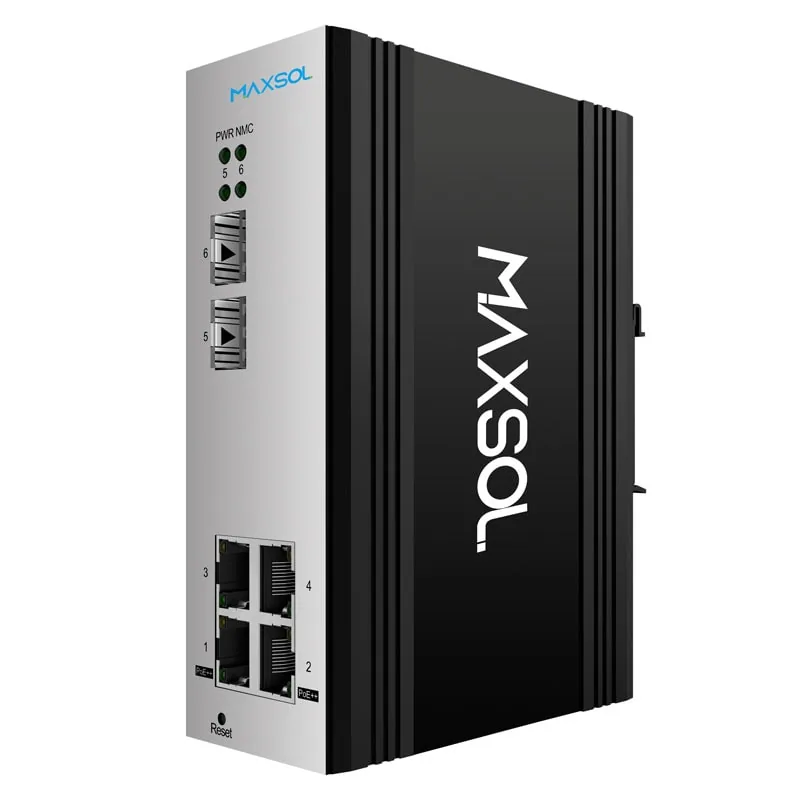
The PS1802FE-HIB hardened industrial PoE switch has eight Fast Ethernet PoE ports, one Gigabit uplink and two SFP uplinks in an IP40 DIN-rail construction. Ports 3–8 support IEEE 802.3af/at, while ports 1–2 support IEEE 802.3af/at/bt up to 90W.
This allocation can suit a design where only one or two remote devices need high power and the remaining endpoints are conventional PoE cameras. Its Fast Ethernet access ports should be assessed against actual traffic demand. They may be suitable for many individual camera links, but do not assume they are the right choice for high-bitrate devices, multiple cameras through an additional downstream switch, or wireless equipment carrying aggregated traffic.
“Hardened” describes the deployment focus, not a substitute for checking the enclosure and site conditions. An outdoor cabinet, for example, still needs appropriate protection against water ingress, condensation, heat, dust, cable entry issues and surge exposure according to the site design.
Pre-installation checklist
Use this checklist before ordering a 90W PoE++ 802.3bt switch or scheduling installation.
Powered-device requirements
- Record the model and maximum power draw of every PD.
- Confirm whether each device supports IEEE 802.3af, 802.3at, 802.3bt or another stated power method.
- Identify devices with peak loads from IR, PTZ movement, heating, cooling or auxiliary functions.
- Check whether the device requires all four pairs for high-power PoE.
- Confirm required Ethernet speed for each endpoint.
Switch and port planning
- Assign every high-power device to a documented high-power port.
- Confirm which access ports provide standard PoE or PoE+.
- Add maximum simultaneous device loads and compare them with the total PoE budget.
- Confirm the required input supply and allow sufficient margin.
- Reserve ports for likely expansion where practical.
- Decide whether Gigabit access ports, Fast Ethernet access ports, SFP uplinks or management functions are needed.
Cabling and site checks
- Verify the cable is solid copper and suitable for the planned power load.
- Test continuity and correct termination of all pairs.
- Include patch leads, surge protectors, couplers and patch panels in the compatibility check.
- Keep channel length and voltage drop within the device and cabling design limits.
- Consider cable bundling and cabinet temperature for sustained high-power loads.
- Plan appropriate earthing, surge protection and enclosure protection for exposed sites.
Commissioning checks
- Test each powered device under its highest expected load, not only at idle.
- Confirm that a device restarts reliably after a controlled power cycle.
- Record switch-port assignments, device demand and cable route details.
- Label high-power ports so future changes do not place a demanding PD on a standard PoE+ port.
Frequently asked questions
Does 90W PoE++ mean the camera receives 90W?
No. It describes the maximum capability associated with the power-sourcing port under stated conditions. Cable resistance and system design reduce the power available at the remote device. Always use the PD’s documented required input power and allow for cable loss.
Can an 802.3af or 802.3at device connect to a 90W PoE port?
Standards-based PoE is designed to negotiate power between compatible equipment. In practice, confirm the switch documentation, device documentation and any intermediate components. Avoid assuming compatibility where a device uses passive or proprietary PoE.
Is Cat6 mandatory for 90W PoE?
Not automatically. Cable suitability depends on the complete cabling system, conductor quality, length, temperature, bundling and the requirements of the PSE and PD. Good-quality solid copper structured cabling and correct four-pair termination are more important than relying on a category label alone.
Can two 90W devices run at once?
Only if the switch has at least two eligible high-power ports and its total PoE budget, input supply and cabling support both devices at their maximum simultaneous demand. Check all of these figures rather than adding devices based only on the number of ports.
For the next step, compare the linked Maxsol models against your required port count, device load, cable distance, input power source, installation environment and management requirements before finalising the design.