Solar Power and PoE for Off-Grid Network Sites
Learn how solar, batteries and PoE can power an off-grid camera or network device, with practical checks for voltage, standards, load and runtime.
By Maxsol Team

Solar power and Power over Ethernet (PoE) can support an off-grid camera, wireless bridge or access point by combining two separate paths. Solar equipment generates, regulates and stores the energy, while a compatible PoE interface adds DC power to an Ethernet cable carrying data from a router, switch, recorder or wireless link.
For an existing PoE camera, the critical question is not simply whether a converter can produce the camera’s stated voltage. You must also confirm whether the camera expects negotiated IEEE PoE or passive power, then check its voltage, polarity, powered pairs, maximum demand and network requirements.
Trace the solar energy and Ethernet data paths
A solar-powered PoE installation has an energy path and a data path. They meet at the PoE power-sourcing interface, but they begin separately.
A typical energy path is:
- PV panel: Converts sunlight into DC electricity.
- Solar charge controller: Regulates the panel output and manages battery charging.
- Battery: Stores energy for night-time operation and periods of limited solar generation.
- DC protection and distribution: Supplies a protected DC feed to the networking equipment.
- Compatible DC-to-PoE interface: Converts or regulates the battery-side voltage and places power onto the required Ethernet conductors.
- Powered device: Receives data and compatible power through its Ethernet port.
The data path could be:
- A network video recorder, router, Ethernet switch, cellular router or wireless CPE supplies Ethernet data.
- The data enters the PoE converter or injector.
- The PoE interface passes the data through while adding power.
- One Ethernet cable runs to the camera, access point or bridge.
A PoE converter does not create an internet connection or video network by itself. If a remote camera needs to communicate with a control room, it still requires a data route, such as a point-to-point wireless bridge, cellular connection, fibre service or local Ethernet network.
Connecting an existing PoE camera
Before replacing mains power with solar, document how the camera is currently powered. Look at its datasheet and label rather than relying only on the connector type.
Check whether it uses:
- IEEE 802.3af, 802.3at or 802.3bt PoE;
- a manufacturer-specific passive PoE input;
- a separate DC input;
- a non-standard pin assignment;
- optional functions such as infrared illumination, a heater, a fan, pan-tilt-zoom motors or an illuminator.
If the camera has both an RJ45 port and a DC input, do not assume both may be energised at once. Follow the camera manufacturer’s documented connection method.
Keep charging, storage and PoE as separate functions
Treating the installation as several connected subsystems makes design faults easier to identify. A solar panel does not directly provide stable PoE, and a battery does not determine which Ethernet power protocol a camera accepts.
| Function | Main purpose | Key checks |
|---|---|---|
| PV generation | Produces energy during usable sunlight | Panel rating, orientation, shading and controller limits |
| Charge control | Regulates charging and protects the energy path | PV voltage, current and power limits; battery settings; charging temperature requirements |
| Battery storage | Supports the load when PV production is insufficient | Nominal voltage and energy, usable energy, protection and operating temperature |
| DC conversion | Matches the battery-side supply to the required PoE voltage | Input range, output setting, conversion losses and continuous load limit |
| PoE delivery | Places power onto the Ethernet cable | IEEE negotiation or passive operation, polarity, pinout and power capacity |
| Network transport | Carries video and other data | Data source, bandwidth, cable distance, wireless link and network configuration |
For example, the Maxsol CS12060 120W and 768Wh solar system documents a 120W monocrystalline panel, a 12.8V 60Ah 768Wh LiFePO4 battery, an MPPT controller and three DC12V outputs. Optional RS485 is also documented.
Those headline values do not establish a universal runtime or prove compatibility with a particular PoE device. Confirm the current datasheet and supplied configuration, including the controller’s permitted PV voltage, current and power, battery charging temperatures and protection behaviour.
The battery’s nominal 768Wh rating is also not the same as usable energy delivered to a camera. Protection thresholds, conversion losses, temperature, cable losses and the permitted depth of discharge all affect what reaches the load.
Distinguish passive PoE from IEEE negotiation
Passive PoE and IEEE PoE may use similar cables and connectors, but their power behaviour is fundamentally different.
IEEE PoE
With standards-based IEEE PoE, compatible power-sourcing equipment checks for a valid powered device before applying normal operating power. Depending on the standard and equipment, the source and device may also classify or negotiate power requirements.
This process reduces the chance of sending power to an ordinary Ethernet port. It does not eliminate the need to check the required PoE standard and power capacity, especially for equipment with high-power functions.
Passive PoE
A passive PoE source generally places a preset voltage onto specified Ethernet conductors without IEEE powered-device detection. Compatibility therefore depends on matching the device’s requirements exactly.
A passive design must confirm:
- output voltage;
- polarity;
- positive and negative conductor pairs;
- acceptable voltage at the device after cable loss;
- continuous and peak power;
- connector wiring;
- whether the Ethernet port is designed to receive passive power.
Incorrect passive PoE can damage equipment. An adjustable voltage control does not, by itself, provide IEEE detection, classification or negotiation.
| Attribute | Negotiated IEEE PoE | Passive PoE |
|---|---|---|
| Power application | Applied after compatible device detection | Typically applied whenever the output is active |
| Compatibility basis | Relevant IEEE standard and available power | Exact voltage, polarity, pinout and device requirements |
| Ordinary Ethernet device protection | Detection helps avoid unwanted power application | No equivalent protection should be assumed |
| Adjustable voltage | Not the defining feature | Often available, but does not make the source IEEE-compliant |
| Best selection method | Match the device standard and maximum demand | Verify every electrical and wiring detail |
If a camera datasheet says only “PoE”, obtain the full specification. The term alone does not identify the standard, voltage arrangement or maximum wattage.
Match battery and converter operating voltages
Voltage compatibility must be checked across the complete operating range, not only at nominal values. A battery described as 12V or 12.8V will operate above and below that nominal figure during charging and discharge.
The converter input must accept the highest and lowest voltage that the battery system may present while remaining within its documented limits. The converter output must then match the powered device without exceeding its acceptable range.
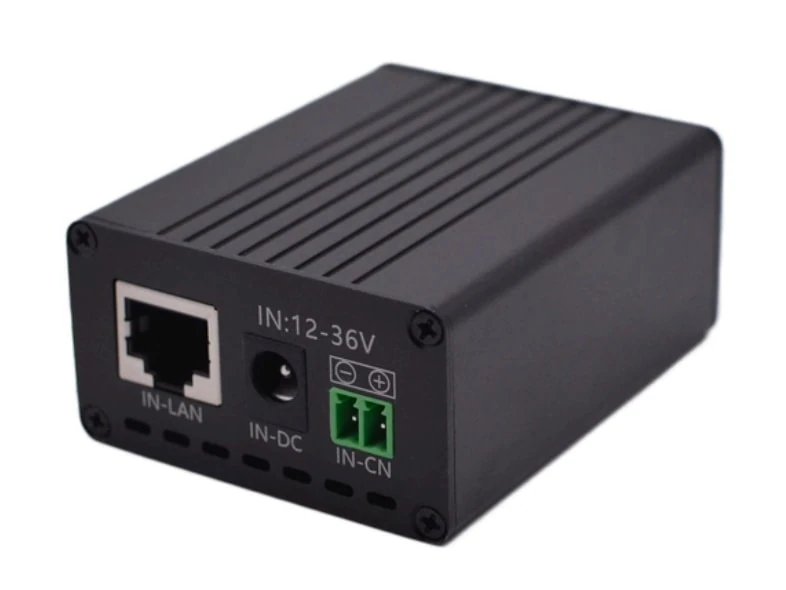
The Maxsol POE24V DC-to-PoE converter documents:
- a 12–36V DC input range;
- adjustable 12–57V PoE output;
- Gigabit Ethernet;
- an LCD voltage display;
- a maximum continuous load of 30W for documented 12V-to-48V operation;
- conversion efficiency of up to 94%.
“Up to 94%” is a maximum figure, not a value that should be assumed for every voltage, load or operating condition. Likewise, adjustable output does not establish IEEE PoE support. Powered-device detection or negotiation is not confirmed by the approved product facts, so voltage, polarity, pinout and protocol compatibility must be independently verified.
The linked solar system and converter are selection examples, not a tested compatible bundle. A designer still needs to confirm the current specifications and the exact supplied configuration.
Account for cable voltage drop
Voltage at the converter is not necessarily voltage at the camera. Current flowing through a long Ethernet cable creates voltage drop, with the result depending on conductor resistance, cable length, power demand and which conductors carry the current.
Check:
- the powered device’s minimum input voltage;
- the converter’s permitted output range;
- cable category and conductor material;
- total cable length, including patch leads;
- current per powered pair;
- connectors and surge-protection devices in the path.
Do not raise the output voltage simply to compensate for an unexplained fault. First confirm the camera’s permitted input range and identify whether the loss is caused by distance, poor terminations, undersized conductors or another component.
Budget continuous and start-up demand
An off-grid system must support both average energy use and the highest short-duration demand. Cameras and radios can draw more power when starting, enabling infrared LEDs, transmitting heavily, operating motors or activating temperature-control functions.
Use the device manufacturer’s maximum input figure where available. A bench reading taken in daylight with optional features inactive is not a reliable design load.
For a multi-device network, calculate:
- each device’s maximum continuous demand;
- simultaneous peak or start-up demand;
- PoE converter or switch losses;
- charge-controller and auxiliary consumption;
- wireless backhaul, router and recorder loads;
- future ports only where expansion is genuinely planned.
The detailed process for multiple ports is covered in this PoE power budget guide for security cameras.
Hypothetical demand example
The following figures are hypothetical design assumptions, not measured product performance:
- camera normal demand: 8W;
- camera demand with infrared active: 15W;
- wireless network device: 6W;
- converter and control allowance: 3W.
Under these assumptions, the site could require 17W during ordinary operation and 24W when infrared is active. The design would need to support the 24W condition continuously for as long as that mode may remain active, rather than sizing only for the 17W figure.
At a hypothetical constant 20W total demand, the equipment would consume 480Wh over 24 hours before additional system losses are considered. That calculation describes load energy only; it does not prove that a nominal 768Wh battery will provide a particular runtime.
Solar generation, low-sun autonomy and battery reserve require a separate site-specific assessment. The process is explained in the off-grid solar sizing guide for CCTV systems.
New Zealand sites should be assessed for their actual low-sun season, local shading and installation environment rather than an annual-average assumption. A system that balances on a clear summer day may not maintain the same energy margin through winter or prolonged cloud.
Review a compatible architecture checklist
Use this checklist before purchasing components or converting an existing camera site.
Powered-device compatibility
- Identify the camera, access point or bridge model and hardware revision.
- Confirm whether it requires IEEE 802.3af, 802.3at, 802.3bt or passive PoE.
- For passive PoE, confirm voltage, polarity and powered-pair pinout.
- Record maximum continuous demand and any start-up or feature-related peak.
- Check whether optional heaters, infrared lights, motors or accessories alter the load.
- Confirm the required Ethernet speed.
- Verify the device manufacturer’s maximum cable distance and cable requirements.
Solar and battery path
- Verify panel voltage, current and power against the charge controller’s input limits.
- Confirm controller settings are suitable for the specified battery.
- Check battery charging and discharge temperature requirements.
- Establish what protection or low-voltage disconnection is provided.
- Calculate energy use for the full operating schedule.
- Assess the site for seasonal sunlight, shading and required autonomy.
- Treat nominal battery watt-hours as stored-nameplate energy, not guaranteed delivered energy.
DC-to-PoE interface
- Check the converter’s full input range against battery charge and discharge voltages.
- Confirm output voltage at the intended load.
- Verify whether the output is passive or negotiated IEEE PoE.
- Keep continuous and peak loads within documented limits.
- Allow for conversion and cable losses without relying on maximum efficiency.
- Confirm polarity and pin assignment before connecting the device.
- Avoid treating an adjustable output as evidence of standards compliance.
Data and network design
- Identify the data source: switch, router, recorder, wireless bridge or cellular router.
- Confirm that the converter passes the required Ethernet speed.
- Check bandwidth for the intended video streams or wireless traffic.
- Plan IP addressing, remote management and time synchronisation.
- Decide how equipment will recover after low-voltage shutdown or power interruption.
- Confirm whether remote reboot or managed switching is required.
- Protect and install outdoor cabling, connectors and enclosures for the actual environment.
Commissioning checks
Before attaching the powered device, measure and verify the output voltage and polarity using appropriate test equipment. Confirm pinout, then test the complete system with all high-demand functions enabled.
Commissioning should also include:
- operation after a cold start;
- operation while the battery is charging;
- operation near the system’s low-voltage threshold;
- camera night mode or wireless peak traffic;
- recovery after intentional power removal;
- network throughput and packet stability;
- inspection of cable terminations and voltage at the far end.
Do not use commissioning to discover basic protocol compatibility. Connecting a standards-based camera to an unverified passive source may expose it to power before any test can be completed.
Common mistakes to avoid
Connecting the panel directly to a PoE injector: PV voltage varies with sunlight and operating conditions. A properly designed system requires charging regulation and energy storage between generation and the load.
Assuming all RJ45 PoE inputs are interchangeable: The connector does not prove that voltage, pinout or protocol matches.
Sizing from normal daytime demand: Infrared, heaters, motors and radios may create the governing load at night or during start-up.
Using nominal battery watt-hours as guaranteed runtime: Delivered energy depends on operating limits, losses, temperature and system configuration.
Ignoring the network path: Powering a camera does not give it connectivity. The data source and backhaul must be designed separately.
Selecting from voltage alone: Even when input and output voltage ranges appear suitable, polarity, powered pairs, PoE negotiation, continuous power and cable loss still require verification.
Assuming two individually suitable products form a verified system: Interfaces, settings and supplied configurations can vary. Compatibility must be checked at system level.
A practical next step is to document the powered device’s PoE method, maximum load and data requirements, then compare the linked Maxsol examples with the project’s port count, load, cable distance, power architecture, environmental conditions and management requirements.